Another digression at this point, because this took me quite some time to figure out.
After I installed Ubuntu as described earlier, everything seemed to work fine, until I realized that the main drive (mapped to ‘/’ in Ubuntu) was running out of space. Given that I use a 512GB drive, I was a bit shocked.
First, I searched for the largest folders on the drive, to find the culprit. The best tool to support you here is the nCurses Disk Usage tool. You can install it as follows:
sudo apt-get install ncduAfterwards, you can run it like this for the root folder:
sudo ncdu /You will end up with a screen like that (with your folders sorted by size):
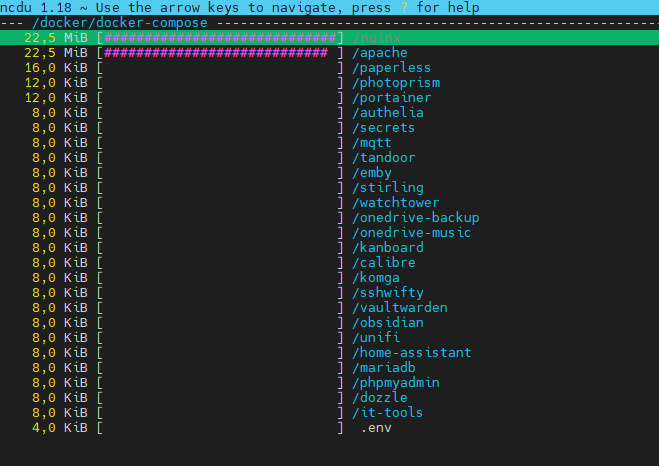
Even so, this was very helpful, I did not find any folder that was really exceedingly large. So, what next? After running df -h to again check the size of the drives, I realized that the line for the root folder looked like this:
/dev/mapper/ubuntu--vg-ubuntu--lv 4,0G 3,6G 0,4G 90% /So basically, my root folder only had 4GB of space, of which 90% were already used. But why? Again, I had put a 512GB SSD in. Further research, especially searching for the name of the filesystem (ubuntu--vg-ubuntu--lv) revealed the root cause. The LVM partition (logical volume) did not use all the space of the volume group. Ubuntu uses volume groups and logical volumes within them and maps the root folder to it. Read this for more detail, please.
So, first I called sudo vgdisplay to check if there was still free space in the volume group. And sure enough, there were more than 470GB still available (see “Free PE / Size”).
  --- Volume group ---
  VG Name               ubuntu-vg
  System ID
  Format                lvm2
  Metadata Areas        1
  Metadata Sequence No  3
  VG Access             read/write
  VG Status             resizable
  MAX LV                0
  Cur LV                1
  Open LV               1
  Max PV                0
  Cur PV                1
  Act PV                1
  VG Size               <473,89 GiB
  PE Size               4,00 MiB
  Total PE              121315
  Alloc PE / Size       922 / <3,61 GiB
  Free  PE / Size       121315 / <473,89 GiB
  VG UUID               bTkwD5-jadm-RbQB-1Hh1-2P4M-FiYW-EfPLfm
A call to sudo lvdisplay then confirmed, that the logical volume was much smaller:
  --- Logical volume ---
  LV Path                /dev/ubuntu-vg/ubuntu-lv
  LV Name                ubuntu-lv
  VG Name                ubuntu-vg
  LV UUID                W8dT1K-3aK9-rbjS-kO03-R6Os-8c52-jlwS5K
  LV Write Access        read/write
  LV Creation host, time ubuntu-server, 2023-12-04 11:43:11 +0100
  LV Status              available
  # open                 1
  LV Size                <4,0 GiB
  Current LE             922
  Segments               1
  Allocation             inherit
  Read ahead sectors     auto
  - currently set to     256
  Block device           252:0
Now, run lvextend -l +100%FREE /dev/ubuntu-vg/ubuntu-lv to use up all available space in the volume group. and confirm by calling sudo lvdisplay again:
  --- Logical volume ---
  LV Path                /dev/ubuntu-vg/ubuntu-lv
  LV Name                ubuntu-lv
  VG Name                ubuntu-vg
  LV UUID                W8dT1K-3aK9-rbjS-kO03-R6Os-8c52-jlwS5K
  LV Write Access        read/write
  LV Creation host, time ubuntu-server, 2023-12-04 11:43:11 +0100
  LV Status              available
  # open                 1
  LV Size                <473,89 GiB
  Current LE             121315
  Segments               1
  Allocation             inherit
  Read ahead sectors     auto
  - currently set to     256
  Block device           252:0
And voilá, now my root folder has all the space it needs, as another call to df -h confirmed:
/dev/mapper/ubuntu--vg-ubuntu--lv 466G 94G 353G 21% /◄ Own Domain Docker ►
Wenn Sie diese Felder durch einen Klick aktivieren, werden Informationen an Facebook, Twitter, Flattr, Xing, t3n, LinkedIn, Pinterest oder Google eventuell ins Ausland übertragen und unter Umständen auch dort gespeichert. Näheres erfahren Sie durch einen Klick auf das i.


