
Introduction
Today I would like to talk about quality attributes. They are often also called “non-functional requirements”, but I don’t really like that term, because it makes them sound unimportant for the customer. However, they are essential when developing a system. From an architecture perspective they are critical, because the quality attributes are the main input for your architecture decisions. If you consider the wrong attributes, your whole architecture backbone will be wrong, leading to high effort and costs and bad product quality. Eventually your project might even fail.
So how shall you deal with these quality attributes? How can you collect and prioritize them? How can you make sure that you properly consider them in your design?
Well, let’s start with a bad example for a quality attribute, which you will typically get from your product managers. “The system shall be user-friendly.” I think we can all agree that this requirement is completely useless. It does not fulfill the basic characteristics for good requirements, e.g. verifiability. But what shall you do if you get a quality requirement like that? How about talking to your product management? Obviously usability is very important for them, but they seem to have no clue how to create one or many useful requirements for this quality attribute. But how can you get those requirements then?
Utility Tree
The answer is “Use a utility tree!” A utility tree is a tree that holds the quality characteristics and sub-characteristics and lists scenarios for each of them. Those scenarios are then prioritized. ATAM uses this mechanism for architecture reviews, but it is ideal for collecting the quality requirements as well. The best way is, to start out with the characteristics and sub-characteristics specified in ISO 25010. I have put all of them in a graphic:

ISO Quality Model
Scenarios
Now you discuss with your product management (or actually any of your stakeholders), which of those sub-characteristics are important for your product and you define scenarios to describe them. Each scenario is described using the following elements:
- The system under consideration, i.e. what part of the system is affected by the scenario (this may also be the system itself).
- The stimulus that triggers the scenario.
- The source of that trigger, e.g. a user input, a malfunction.
- The response of the system when the stimulus occurs.
- The measure for the response.
- The environment in which the stimulus can occur, i.e. the conditions that must be fulfilled for the scenario to happen.
The following schematic representation for the description of scenarios has been adopted from a presentation by Michael Stal:
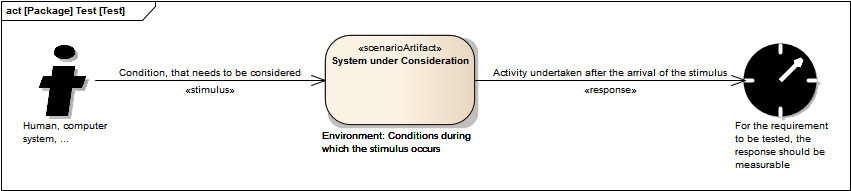
Description of Scenarios for Quality Attributes
So how will that look in detail in a real life scenario? Well, let’s assume, you want to determine the required response time of the user interface. This falls under the sub-characteristic of “Time Behavior” of the “Performance Efficiency” characteristic. So you will ask your product manager how long it shall take at most when a user presses a button to open a dialog and document that accordingly:

Sample Scenario for Time Behavior
Prioritization
Naturally you will need to create multiple scenarios for different cases of the user interface, but I guess you get the picture. Once you collected all of your scenarios, you will need to have them prioritized, especially if there are conflicting scenarios (e.g. a fast response may be affected if for fault tolerance scenarios information needs to be stored redundantly, which may take longer). For the prioritization we will typically use the following two criteria (but feel free to add more if needed):
- Importance to the business, i.e. to the success of your product.
- Complexity of the solution, i.e. how risky or hard is it to realize this scenario.
You and your product manager will rate both on a scale of “Low”, “Medium”, “High” and assign that priority to the scenarios. Those scenarios with a “High” (e.g. (H,H), (H,M) or (M,H)) are the ones you’ll need to focus on.
After all of that you can derive the quality requirements, e.g. “The system shall open a dialog as response to a button click by the user within a maximum of 30 ms under normal operation.”
I hope that helps as a start. Feel free to ask, if you would like to know more about this method.
Wenn Sie diese Felder durch einen Klick aktivieren, werden Informationen an Facebook, Twitter, Flattr, Xing, t3n, LinkedIn, Pinterest oder Google eventuell ins Ausland übertragen und unter Umständen auch dort gespeichert. Näheres erfahren Sie durch einen Klick auf das i.


